Supplier feed integration for custom-built stores
Connect supplier feeds to your existing catalog. PIMPORT imports products, applies your markup, and updates prices and availability on a schedule. We develop the integration module around your store’s catalog structure.
The assessment is free. Start with your store URL and a sample supplier feed.
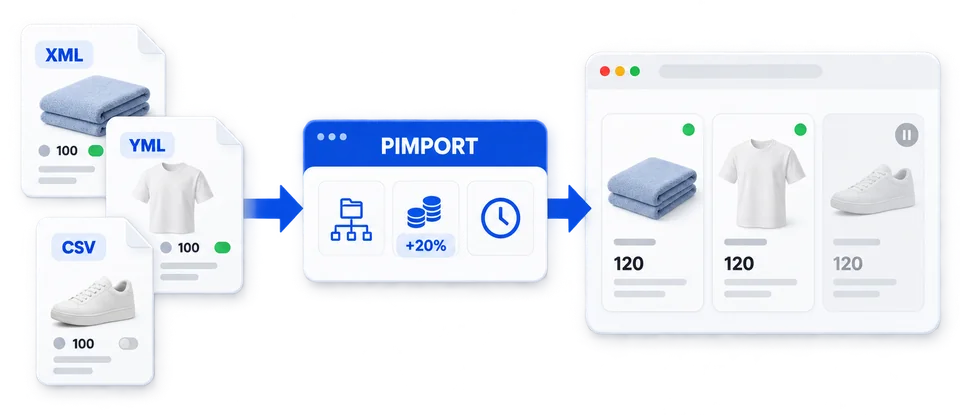
What changes in your catalog
One product as an example: the first import creates the card, the next one updates its price and availability by the agreed rules.
| Stage | Supplier price | Store price | Availability | What happened |
|---|---|---|---|---|
| First import | 100 | 120 | In stock | Card TEXT-001 created |
| Next import | 120 | 144 | In stock | The same card updated |
| Dropped from the feed | — | — | Hidden | The card stays, the product is taken off sale |
How products are matched and what happens when one leaves the feed are agreed for your catalog. Categories and markup are set by you.
Catalog import
Products, categories, attributes and images from XML, YML, CSV and Excel feeds. Without a feed, data can be collected from the supplier’s website — that costs more.
Scheduled prices and availability
A cron job updates prices and stock with no manager involved. A repeat import updates the same cards instead of creating new ones.
Your import rules
Markup, rounding, currency conversion and category mapping are set in PIMPORT — by your rules.
Which stores it fits
Here, custom-built means a store whose catalog no ready-made import fits: written from scratch, built on a framework, or reworked from an off-the-shelf CMS so far that its standard modules no longer work.
Your own engine
A PHP store built by an agency or a freelancer. Documentation is optional — we work from the catalog structure.
Built on a framework
Laravel, Yii2, Symfony, CodeIgniter and others: the catalog lives in its own tables, and off-the-shelf import modules do not fit it.
Modified CMS
OpenCart, WooCommerce or another platform with a reworked catalog, pricing or warehouse. We adapt the ready-made driver to your changes — usually faster and cheaper than a module from scratch.
Rare or legacy system
An engine its developer no longer maintains, or a platform nobody writes import modules for. The program talks to a store only through a driver, so it has already been connected to many systems beyond the popular four.
How the connection works
Request
You send the store URL, a sample feed and a short note on what should be imported or updated.
Estimate
We study the catalog: where products, prices and images live, and which identifier to match products by. You get the cost and timeline.
Module and testing
We write the connection module and test it on a copy of your store — the live site is not touched meanwhile.
Launch
You set categories and markup in PIMPORT. We connect the module to the live site, set up the schedule and check the import with your settings.
Cost and what we need for an estimate
What's included →How the cost is set
The program is the same license as for the ready-made platforms: a one-time payment, no mandatory subscription. The module is one-time development and costs more than a standard installation, because it is written and tested against your catalog. The price depends on the catalog structure and the agreed fields; scope, cost and timeline are fixed before development starts. The module stays with you and works without us.
For the estimate
Your store URL, a sample supplier feed, a contact and a few words about the task. No passwords or access at this stage.
After the estimate
The catalog structure — a dump or database access, without customer and order data — and access for testing: FTP or SSH and the store admin.
Hosting
PHP 7.4 or newer, MySQL 5.7+ or MariaDB 10.3+ and one cron job.
For the store’s developer
PIMPORT already parses feeds, applies price rules and runs scheduled updates. For your store we adapt the catalog operations: finding, creating and updating products, changing availability and reading categories. The field list and the details of variants, warehouses, caches and indexes are agreed before work starts.
PHP and MySQL
The main route. The module writes to the catalog with your store’s structure in mind; refreshing caches and search indexes is agreed during the estimate. The program runs next to the store, on the same hosting.
Modified CMS
If your store grew out of OpenCart, WooCommerce, Shop-Script or JoomShopping, we take the ready-made driver and change only what works differently in your store.
A different stack
Python, Node.js, .NET or PostgreSQL. The program needs PHP and access to a MySQL or MariaDB database, so we assess such cases individually and tell you before you pay if the connection is not feasible.
Which operations the module performs
The program talks to the store only through this module, so a connection can be developed for any system — the approach and scope are decided after studying your store.
The module works with the catalog only: it creates products, attributes and prices and updates stock. What exactly is transferred — product variants, SEO fields, multiple warehouses — depends on your store’s database; the field list is agreed before work starts.
Questions about custom-built stores
Ready-made integrations
If your store runs on one of these platforms without major rework, no module needs to be written — it already exists.


